
Move from Captivate to Podhome in one afternoon
Captivate's move is the one to read before you click. Import and check the episodes first. Then Captivate's Moving option sets the redirect and closes that show in the Captivate dashboard. Delete is a different button. Captivate says Delete removes the show from Captivate and from Apple Podcasts, Spotify, and other apps. Use Moving when the show should stay live.
The short steps are Move from Captivate. The price table is Podhome vs Captivate. The shared import is Move your podcast to Podhome.
What you are walking away from
Captivate puts the same tools on every plan and meters monthly downloads, shared across unlimited shows. As of October 2026:
- Personal is $19 a month, or $204 a year ($17 a month billed yearly), for 30,000 downloads. Professional is $49 a month or $528 a year, for 150,000 downloads. Business is $99 a month or $1,080 a year ($90 a month billed yearly), for 300,000 downloads. Above that, Captivate says to email them.
- The pricing page says every plan includes unlimited podcasts and storage, dynamic content insertion, distribution, IAB-certified analytics, private podcasting, a player, a website, and Growth Labs. Features are not restricted by plan. The allowance is shared across the shows on the account.
- One month over the allowance is allowed. A second month in a row, Captivate says they will ask you to move up. The show is not taken offline. Captivate points networks, agencies, and people who host for clients at the Business plan.
- The plans FAQ, updated 20 February 2025, and the pricing page describe a 30-day trial. There is no free hosting plan.
Podhome is one plan at $15.99 a month or $185 a year. Downloads and client shows do not step the price. A new account can try that plan for 30 days. The comparison and the cost calculator use these figures. Re-check Captivate's pricing page before you switch.
The afternoon, in order
1. Start the trial and import
- Sign up. The trial is 30 days of the $15.99 plan.
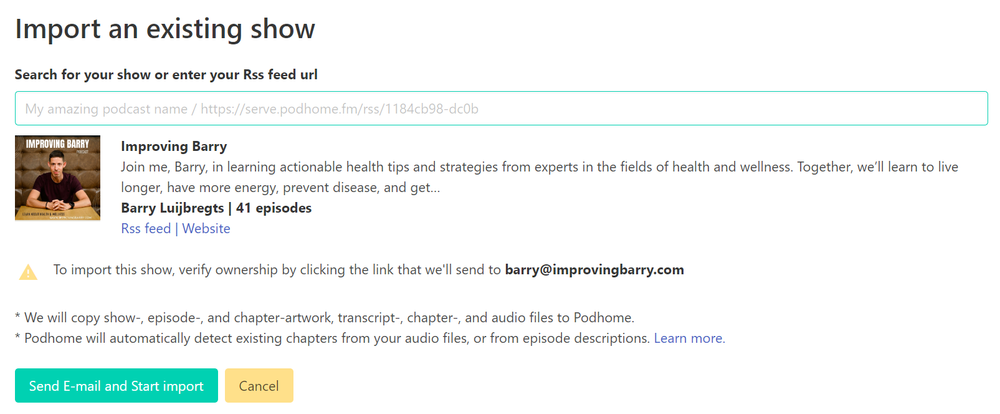
- Import the show by name or by pasting the Captivate RSS URL. Unlock a locked feed first.
- Wait for the email from support@podhome.fm, then open the episodes.
Import copies the feed, including GUIDs when they are present. Podhome does not delete the Captivate account. Listeners are still on Captivate.
2. Check the copy, and download the stats you want
Captivate's cancel-show article, updated 21 March 2025, says analytics do not transfer. Download the numbers you want to keep before you close the show. Confirm titles, dates, artwork, and descriptions in Podhome while you still have the Captivate dashboard.
3. Remove dynamic ads, then choose Moving
The article is How do I cancel a podcast?.
- In Captivate, remove dynamic ads or other dynamic content from the show. The Moving step asks you to confirm that you have.
- Open that podcast's settings, then Cancel Show, and choose Moving.
- Paste the Podhome RSS URL from your dashboard or Distribution page. It looks like https://serve.podhome.fm/rss/ followed by your show id. Pick the host (Other, if Podhome is not listed).
- Confirm the two boxes: the 301 redirect, and that dynamic content has been removed. Then choose Move Podcast.
Captivate says the show is then redirected, and that closing it removes dashboard access for that show unless other shows are still active. Do not choose Delete if the show should remain in the listening apps. Optional: refresh the show in Apple Podcasts Connect.
4. Cancel billing about two weeks later
If other shows are still on the Captivate account, Captivate says billing continues. If this was the last show, wait about two weeks after the redirect before you cancel the Captivate billing account, so directories can follow it. Podhome does not delete the Captivate files.
After the feed has moved
New episodes belong in Podhome. Paste existing directory links into Distribution, then lock the Podhome feed under Leaving Podhome when you are settled. Questions go to support@podhome.fm. The other host notes are on Compare hosts.