
Move from Riverside to Podhome in one afternoon
Riverside is a recording studio that includes podcast hosting on paid plans. Moving the host does not move the recorder. You keep recording wherever you record. You copy the RSS feed into Podhome, check it, and set Riverside's redirect while a paid plan is still active. A deleted Riverside account can no longer be redirected.
The short steps are Move from Riverside. The price table is Podhome vs Riverside. The shared import is Move your podcast to Podhome.
What you are walking away from
As of October 2026, Riverside's pricing page lists a free plan at $0. Podcast hosting is off on that plan. The first plan that includes hosting is Pro: $29 a month, or $24 a month billed annually ($288 a year), for one show. Grow is $39 a month, or $34 billed annually ($408 a year), for two shows. Webinar's FAQ says the monthly price drops from $99 to $79 on annual billing. The Webinar card also prints a yearly total that matches Grow's $408. Re-check that card before you treat $408 as the Webinar invoice. Business, for unlimited shows, is contact sales.
- The price is the studio: separate tracks, an editor, transcriptions, and hosting so a recorded episode can go out on a feed. Separate-track downloads are 15 hours a month on Pro. The pricing comparison does not publish a podcast-download cap.
- Transcription hours are unlimited on the paid plans. Some AI tools spend credits. Pro, Grow, and Webinar start with 2,000. The pricing page does not say how many credits one translation uses.
- The trial on the pricing cards is 14 days. Cancelling Pro, Grow, or Webinar drops the account to free. A free account with no login, recording, share, or export for 120 days is deleted, along with its content. Reading a Riverside email does not count as activity.
Podhome is the hosting plan beside that studio: $15.99 a month or $185 a year, unlimited shows, Podhome AI included, and no recorder in the subscription. A new account can try that plan for 30 days. Podhome does not include Riverside's recording studio. The comparison states that split. Re-check Riverside's pricing page before you switch.
The afternoon, in order
1. Finish the Podhome side first
Riverside's move article says to finish setup at the new host first, so you have the new RSS URL.
- Sign up. The trial is 30 days of the $15.99 plan.
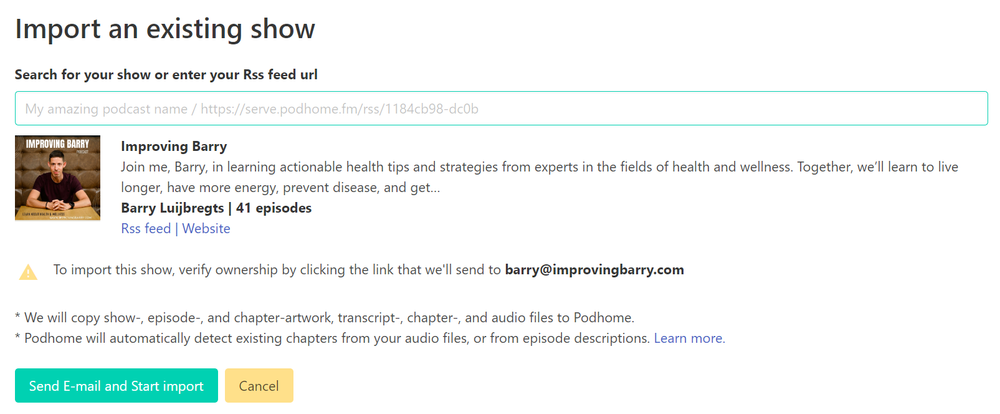
- Import the Riverside RSS feed. Unlock it first if it is locked. Confirm the ownership email if one arrives.
- Wait for support@podhome.fm, then check episodes, artwork, and dates. Listeners are still on Riverside. Stats stored at Riverside do not import.
2. Redirect on a paid plan, in a computer browser
The article is Move your podcast hosting from Riverside. It lists the redirect for Pro, Grow, Webinar, and Business.
- Log in, open the studio, open the account menu at the bottom left, and choose Settings, then Hosting, then Podcast.
- Next to Redirect your podcast, choose Redirect.
- Paste the Podhome RSS URL from your dashboard or Distribution page. It looks like https://serve.podhome.fm/rss/ followed by your show id.
- Check the box that says you understand Riverside will no longer be your podcast host, and choose Redirect again.
Riverside says the change can take up to an hour, and that most listening apps update within 24 to 48 hours, though some take longer. Their timing note is how long a redirect takes. Optional: refresh the show in Apple Podcasts Connect.
3. Do not delete the account to finish the job
Set the redirect before you cancel or delete. If the redirect is already saved, Riverside's delete-account article says it stays after deletion. If you delete first, the feed can no longer be redirected. Deleting the account also removes a show Riverside submitted to Apple Podcasts or Spotify. YouTube episodes are left in place. A show you claimed yourself has to be updated in those dashboards.
Podhome's guide still says to wait about two weeks before you cancel the old host. Cancelling Pro, Grow, or Webinar downgrades the account to free, and the 120-day inactive policy then applies. Keep the account through that window. Podhome does not delete the Riverside account.
After the feed has moved
Keep recording in Riverside, or in whatever you already use, and publish the file in Podhome. Paste existing directory links into Distribution. Lock the Podhome feed under Leaving Podhome when you are settled. If the import cannot find the episodes, paste the RSS URL again and write to support@podhome.fm.
The other afternoon notes are on Compare hosts.