
Move from Transistor to Podhome in one afternoon
Transistor already hosts unlimited shows on the entry plan. The reason people still look at a move is the meter underneath: monthly downloads, storage, and private subscribers, pooled across every show, plus transcription as a paid add-on. The move itself is an import into Podhome, a check, and a 301 you paste into that podcast's settings.
The short steps are Move from Transistor. The price table is Podhome vs Transistor. The shared import is Move your podcast to Podhome.
What you are walking away from
As of October 2026, Transistor's pricing page lists Starter at $19 a month, Professional at $49, and Business at $99. Yearly billing is 12 months for the price of 10: $190, $490, and $990. $190 a year is about $15.83 a month. There is no plan under Starter, and no free hosting plan. The signup cards show the same three prices.
- Starter includes unlimited podcasts, unlimited team members, 20,000 monthly downloads, and 50 private subscribers. The plan-limits help, updated 10 October 2026, lists Starter storage at 250 GB. Downloads, storage, and private subscribers are pooled across the shows on the account. Professional is 100,000 downloads and 500 GB. Business is 250,000 downloads and 1 TB.
- That help article says going over a limit does not add a penalty fee and does not shut the show off. Transistor emails you to upgrade. You are not auto-upgraded.
- AI transcription is a paid add-on. The transcription help, updated 12 October 2026, says new accounts get 60 trial credits, about one hour, then a choice of 5 or 20 transcription hours a month. That article does not publish the add-on's dollar price.
Podhome is one plan at $15.99 a month or $185 a year. Downloads are not the meter. Podhome AI, including transcripts, is included. A new account can try that plan for 30 days. On the yearly invoice, Podhome is $185 and Transistor Starter is $190. The comparison has the rest of the table. Re-check Transistor's pricing page before you switch.
The afternoon, in order
1. Start the trial and import
- Sign up. The trial is 30 days of the $15.99 plan.
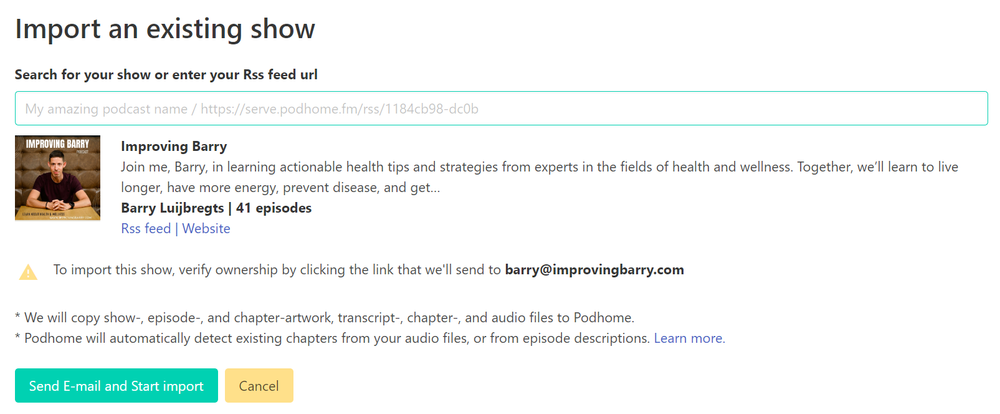
- Choose Import an existing show. Search the name, or paste the Transistor RSS URL. A locked feed has to be unlocked first.
- Confirm the ownership email if Podhome sends one, then wait for the finished email from support@podhome.fm.
Import keeps existing show and episode GUIDs when the feed has them. Podhome does not delete the Transistor show. Listeners stay on Transistor during the import.
2. Check the copy
Read titles, dates, artwork, and descriptions. Download history stays at Transistor. Podhome's analytics start when the media is served from Podhome.
3. Set the permanent 301
Transistor's article, updated 10 October 2026, is How do I create a 301 redirect?. On the podcast's Settings tab, under RSS Feed, paste the Podhome RSS URL into Permanent Redirect (301) of your RSS Feed and save.
The Podhome URL is on the dashboard or the Distribution page. It looks like https://serve.podhome.fm/rss/ followed by your show id. Transistor says the redirect is permanent and free of charge, and that it stays in place if you cancel. Optional: refresh the show in Apple Podcasts Connect.
4. Wait about two weeks anyway
A redirect that survives cancellation is still a redirect directories have to fetch. Podhome's move guide says to wait about two weeks before you cancel. Podhome does not close the Transistor account.
After the feed has moved
Paste the directory links you already have into Distribution. Lock the Podhome feed under Leaving Podhome when you are settled. Transcripts that were an add-on at Transistor can be drafted with Podhome AI on the one plan.
Questions go to support@podhome.fm. The other afternoon notes start at Libsyn, and the index is Compare hosts.