
Move from Libsyn to Podhome in one afternoon
A Libsyn show moves the same way as any other RSS feed: Podhome copies it, you check the copy, then you set a redirect at Libsyn. Listeners stay on Libsyn until that redirect exists. Other shows on the Libsyn account stay there. Billing at Libsyn is a payment profile per show, so you can move one podcast and leave the rest alone.
The short steps are Move from Libsyn. The price table is Podhome vs Libsyn. The import every host shares is Move your podcast to Podhome.
What you are walking away from
Libsyn meters new uploads, per show. Downloads are not the meter. As of October 2026, the prices on Libsyn's own pages look like this:
- The pricing page lists Basic at $12 a month (about 3 hours of audio), Advanced at $25 (about 10 hours), and Max at $150 (about 55 hours). It also points to an $8 plan for the bare essentials. Every listed plan includes a 30-day trial. There is no free hosting plan.
- Libsyn's plan-level help, updated 13 August 2026, lists storage steps between those cards, including Plus at $20, then further plans at $35, $45, $55, and $75 before Max at $150. The marketing page is the shorter list.
- The pricing page says every plan can add up to five users on a podcast. Advanced stats start on the $25 plan. API access, dynamic ad insertion, unlimited storage, and a network RSS feed are Professional and Enterprise, priced by talking to Libsyn.
Podhome is one plan: $15.99 a month or $185 a year, for unlimited shows, episodes, downloads, teammates, analytics, the API, and Podhome AI. A new account can try that same plan for 30 days. For one show that fits Basic, Libsyn's $12 sticker is lower, with about 3 hours of uploads and basic stats. The comparison has the full table. The cost calculator runs the same prices against hours and shows you type in. Re-check Libsyn's pricing page before you switch.
The afternoon, in order
1. Start the trial and import the one show
- Sign up. The trial is 30 days of the $15.99 plan.
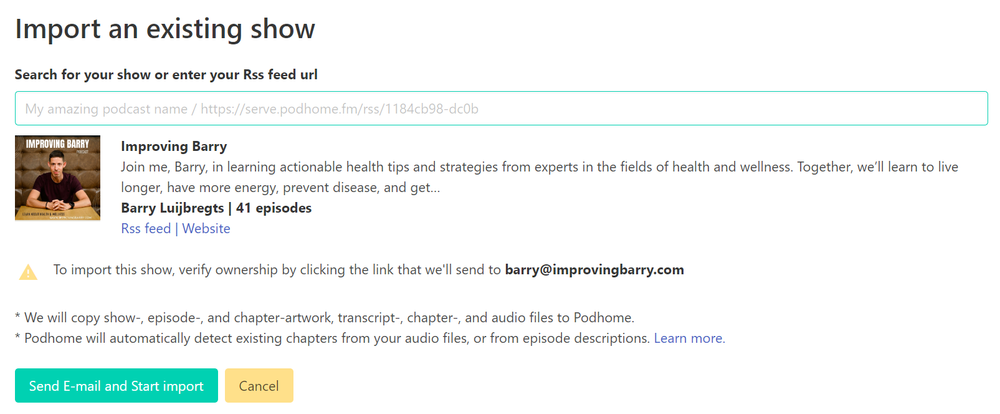
- Choose Import an existing show. Search the podcast name, or paste that show's Libsyn RSS feed. Leave the other Libsyn shows where they are.
- If the feed is locked, unlock it at Libsyn first. If the feed contains an email address, Podhome sends a message to confirm you own the show.
- Start the import. Podhome emails you from support@podhome.fm when it finishes. You can leave a long catalog running.
Import copies audio, artwork, and Podcasting 2.0 data that is in the feed, and it keeps existing show and episode GUIDs when they are present. Podhome does not delete the Libsyn show. Listeners do not move during this step.
2. Check the copy
Open the episodes and the show settings. Confirm titles, dates, artwork, and descriptions. Apps are still reading Libsyn, so a correction here is private. Download statistics do not come across. Podhome analytics start with plays of the Podhome media.
3. Redirect at Libsyn
When the copy looks right, point that show's feed at Podhome. Libsyn's guide is Move your podcast from Libsyn to a new host.
- Copy the Podhome RSS URL from the dashboard or the Distribution page. It looks like https://serve.podhome.fm/rss/ followed by your show id.
- Paste that URL into the 301 redirect for this show, using Libsyn's guide.
- Optional: in Apple Podcasts Connect, refresh the show.
Apps and directories then follow the new feed. Listeners do not need a new subscription. New episodes and edits for this show belong in Podhome. The other Libsyn shows keep their own feeds and their own payment profiles.
4. Leave that Libsyn subscription in place for about two weeks
Directories need time to follow a redirect. Wait about two weeks before you cancel the Libsyn plan for the show you moved. Cancelling sooner can drop the redirect before directories have fetched it. Podhome does not close the Libsyn account.
After the feed has moved
- Distribution links you already have can be pasted into Podhome's Distribution page. The redirect is what moves the audience.
- When you are settled, lock the Podhome feed under show settings, Leaving Podhome, so another host cannot import it by accident.
- Chapters, transcripts, and people can be filled in with Podhome AI, or by asking Claude. Setup is Manage your podcast with Claude.
If the import cannot see the feed
Unlock the feed at Libsyn, then paste the RSS URL into Podhome's import search. Email support@podhome.fm if it still will not import.
The same two-step move works from other hosts. Afternoon notes for Buzzsprout, Podbean, Spotify for Creators, Transistor, Captivate, and Riverside are on the blog. The index is Compare hosts.