
Move from Podbean to Podhome in one afternoon
Moving from Podbean is an import, then a redirect you set at Podbean. Podhome copies the episodes the feed actually lists. The Podbean account stays in place, and listeners stay on it, until that redirect is saved. The useful check, before anyone follows you, is whether the feed contained the whole archive.
The short steps are Move from Podbean. The price table is Podhome vs Podbean. The shared import is Move your podcast to Podhome.
What you are walking away from
Podbean's entry paid plan is one public channel, a monthly upload cap, and a monthly AI credit allowance. As of October 2026:
- Unlimited Audio is $17 a month, or $12 a month billed annually ($144 a year): one audio podcast, 1 GB of uploads a month (about 16 hours), unmetered bandwidth subject to a fair-use policy, and 600 AI credits. More credits can be bought.
- Unlimited Plus is $39 a month, or $29 billed annually, for two audio or video podcasts, 10 GB of uploads, and 2,400 AI credits. Network is $99 a month, or $79 billed annually, with unlimited public podcasts, 40 GB of uploads, 6,000 AI credits, 50 team members, and 3 TB of monthly bandwidth. Podbean says overage bandwidth on Network is $0.03 per GB.
- A free account exists. Podbean's free-plan help, last modified 10 January 2025, lists 5 hours of total storage and an RSS feed that displays up to 20 episodes. Paid plans cannot be downgraded back to the free account. The start page advertises a 14-day trial of the paid plans.
Podhome is one plan: $15.99 a month or $185 a year, with unlimited shows, episodes, downloads, and Podhome AI. Podhome AI is not a credit meter. There is no free tier. A new account can try that plan for 30 days. The comparison and the cost calculator use these prices. Re-check Podbean's pricing page before you switch.
The afternoon, in order
1. Start the trial and import
- Sign up. The trial is 30 days of the $15.99 plan.
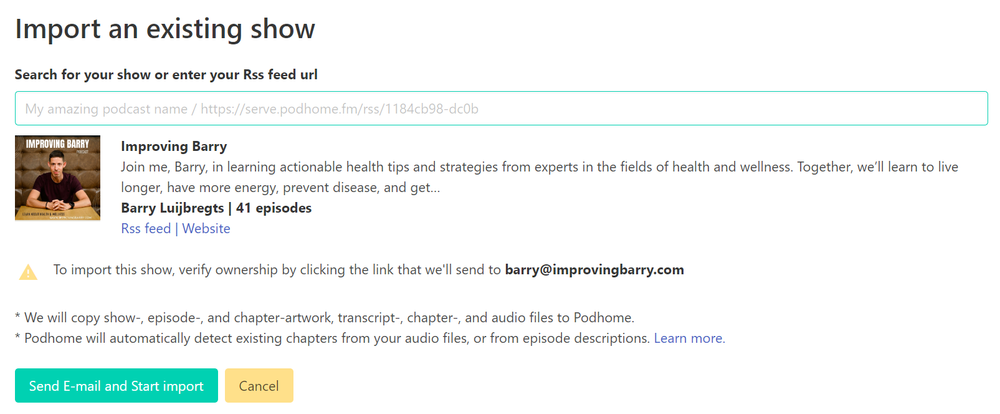
- Choose Import an existing show. Search the podcast name, or paste the Podbean RSS URL.
- Unlock the feed first if it is locked. If it contains an email address, Podhome sends a message to confirm you own the show.
- Wait for the email from support@podhome.fm.
Import copies what the feed exposes, including artwork and Podcasting 2.0 data, and it keeps existing GUIDs when they are present. Podhome does not delete the Podbean show.
2. Count the episodes before you redirect
If the show is on Podbean's free plan, compare the episode list with the feed. The January 2025 free-plan article says that feed displays up to 20 episodes. Import copies the episodes that feed contains. Move any missing media, and confirm titles, dates, and artwork, while apps are still on Podbean. Download statistics do not come across.
3. Redirect at Podbean
Podbean's guide is Moving to a new host. Paste the Podhome RSS URL from your dashboard or Distribution page. It looks like https://serve.podhome.fm/rss/ followed by your show id. Optional: refresh the show in Apple Podcasts Connect.
From here, new episodes belong in Podhome. Listeners who already subscribe follow the redirect. They do not resubscribe.
4. Wait about two weeks
Leave the Podbean account in place for about two weeks after the redirect, so directories can follow it. That timing is in Podhome's move guide. Podhome does not close the Podbean account.
After the feed has moved
- Paste existing Apple, Spotify, and other directory links into Podhome's Distribution page. Those badges are for your website. The redirect moves the audience.
- Lock the Podhome feed under Leaving Podhome when you are settled.
- A second show, or Podhome AI on the archive, stays on the same subscription. Podhome AI drafts transcripts, chapters, and notes. Claude can edit them after you connect. The setup is Manage your podcast with Claude.
If the import stalls, unlock the feed and write to support@podhome.fm. Afternoon notes for the other hosts are linked from Libsyn and the compare index.